
How to Find PEZ at Walmart Using the Walmart App
Have you ever driven from one Walmart to another searching for a new PEZ release, only to come home empty-handed?
We’ve all been there!
Not long ago, we discovered a handy feature in the Walmart app that can make the hunt a little easier. While it isn’t perfect, it can save collectors both time and gasoline by checking whether a store may have a particular PEZ item in stock.
How It Works
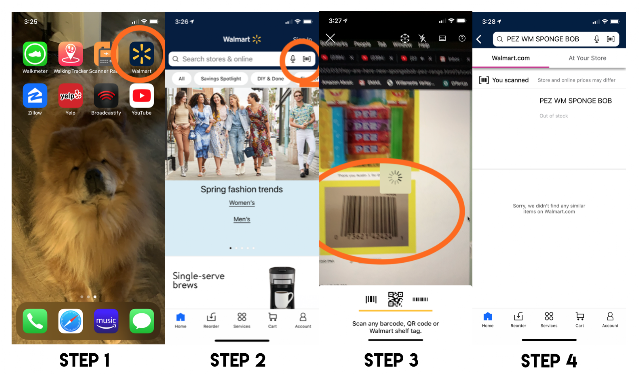
Step 1: Download and open the Walmart app.
Step 2: Tap the barcode scanner.
Step 3: Scan the product’s UPC barcode.
The barcode can be scanned directly from almost anywhere, including a computer monitor, a printed page, or another image.
Step 4: View the results.
You can even change your preferred store location to check inventory at nearby Walmart locations.
A Helpful Tool for Collectors
Like any inventory system, the results aren’t always perfect, and sometimes the best way to find a new PEZ dispenser is still to visit the store in person.
However, this is another useful tool to add to your PEZ hunting toolbox and can make tracking down new releases a little easier.
We hope this tip helps you find the PEZ you’re looking for.
Happy Hunting!
March 7, 2020